
Download T Shirt Maker – Free Online T‑Shirt Design Tool for Creators & Entrepreneurs
Overview
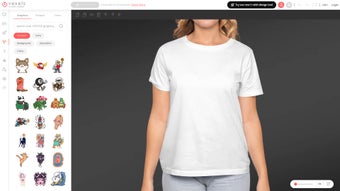
T Shirt Maker is a cloud‑based design platform that lets anyone—from hobbyists who want a custom gift to seasoned graphic designers launching a full apparel brand—create market‑ready T‑shirt artwork without ever installing bulky software. The service hosts an ever‑growing library of more than 100,000 royalty‑free vectors, icons, patterns, and fonts, all searchable by keyword, style, or theme. Its drag‑and‑drop canvas works directly in the browser, meaning you can design on a desktop, laptop, tablet, or even a smartphone.
Because the application runs entirely online, updates are applied automatically, security is handled via HTTPS encryption, and there are no hidden version‑upgrade fees. Beyond the creative side, T Shirt Maker integrates seamlessly with the most popular Print‑on‑Demand (POD) services such as Merch by Amazon, Redbubble, Teespring, and Spreadshirt. After finishing a design, a single click pushes the artwork to any connected store, where you can set pricing, add product descriptions, and start earning royalties immediately.
This end‑to‑end workflow reduces the time from idea to revenue from weeks to minutes. Whether you’re testing a niche market, launching a brand, or simply customizing a shirt for a special event, T Shirt Maker offers a low‑risk, high‑reward solution that combines creativity, convenience, and commercial potential—all while keeping the user experience friendly and intuitive. The platform’s free tier provides unlimited design creation, making it an attractive entry point for entrepreneurs who want to validate concepts before committing to larger investments.
Key Features & Benefits
- Vast Graphic Library: Over 100,000 royalty‑free vectors, icons, patterns, and typography options, refreshed weekly to keep trends current.
- Intuitive Drag‑and‑Drop Canvas: No design experience required; move, resize, rotate, and layer elements with a single click or touch gesture.
- Real‑Time Mockups: Instantly preview artwork on multiple T‑shirt colors, styles, and fits (crew, v‑neck, hoodie, long‑sleeve).
- One‑Click POD Integration: Export directly to Merch by Amazon, Redbubble, Teespring, Spreadshirt, and other major print‑on‑demand platforms.
- AI‑Powered Color & Layout Suggestions: The system analyses your design and proposes complementary palettes and balanced compositions.
- Collaboration Mode: Invite teammates or clients to view, comment, and edit designs in a shared workspace with permission controls.
- High‑Resolution Export Options: Download PNG (transparent), SVG (editable vector), or PDF (print‑ready) at 300 DPI.
- Secure Cloud Storage: All projects are saved automatically to your account and can be accessed from any device.
- Free Tier & Scalable Upgrades: Unlimited design creation for free; premium plans unlock AI features, priority support, and additional graphics.
- Analytics Dashboard (Premium): Track clicks, conversions, and revenue per design across connected POD stores to refine your product line.
The combination of these features makes T Shirt Maker more than a simple graphics editor—it functions as an all‑in‑one design studio, testing lab, and sales channel. Beginners benefit from the ready‑made templates, searchable assets, and AI suggestions that help bypass “designer’s block.” Power users appreciate granular control over layers, vector exports, and the ability to upload custom assets for brand‑specific work. Because the platform is browser‑based, you never have to worry about operating‑system compatibility, hardware requirements, or costly license renewals. The built‑in analytics (available on premium plans) also give data‑driven insight, showing which designs generate the most clicks and sales, allowing you to iterate quickly and focus on high‑performing concepts. Overall, T Shirt Maker’s feature set is designed to accelerate the journey from creative spark to profitable product.
Installation, Usage & Compatibility
Getting Started – No Download Required
Since T Shirt Maker is delivered as a Software‑as‑a‑Service (SaaS) solution, there is no traditional installation process. To begin, visit tshirtmaker.com, click “Sign Up,” and create a free account using an email address or a social login (Google, Facebook, Apple). After confirming your email, you are taken to a personalized dashboard where the design canvas loads instantly. The onboarding wizard walks you through selecting a product type (standard T‑shirt, long‑sleeve, hoodie, etc.), choosing a base color, and optionally importing your own brand assets. All actions are saved automatically in the cloud, so you can close the browser and return later without losing any progress.
Step‑by‑Step Workflow
- Select a Template or Start Blank: Choose a curated layout for popular niches (vintage, sports, memes) or begin with a completely blank canvas.
- Add Graphics: Drag items from the library onto the canvas, adjust size, opacity, rotation, and layering using intuitive handles.
- Insert Text: Use the text tool to add slogans, select from over 200 fonts, enable auto‑curving for circular designs, and apply color palettes.
- Apply AI Suggestions (Premium): Click “Smart Assist” to receive automatic color harmonies, layout refinements, and spacing recommendations.
- Preview Mockups: Switch to “Mockup” mode to view realistic 3‑D models, toggle garment colors, and rotate the view for a 360° inspection.
- Export or Publish: Choose “Export” for high‑resolution PNG, SVG, or PDF files, or click “Publish to POD” to send the design directly to your connected print‑on‑demand accounts.
- Track Performance (Premium): After publishing, monitor clicks, conversions, and earnings from the built‑in analytics dashboard.
Operating System Compatibility
T Shirt Maker runs on any modern web browser, making it compatible with Windows 10/11, macOS 12+, Linux distributions, Chrome, Firefox, Safari, Edge, as well as mobile browsers on Android 10+ and iOS 14+. Because it is cloud‑based, performance depends primarily on internet speed rather than device hardware. The interface is fully responsive, offering a smooth experience on desktops, laptops, tablets, and large smartphones. Touch gestures such as pinch‑to‑zoom, drag, and tap work seamlessly on touch‑enabled devices, ensuring that designers can work comfortably whether they are at a desk or on the go.
Pros & Cons
- Pros
- Zero installation—access from any device with an internet connection.
- Extensive, royalty‑free graphic library eliminates the need for external assets.
- Direct one‑click integration with major POD services speeds up time‑to‑market.
- Free tier provides unlimited designs, ideal for testing concepts without financial risk.
- Real‑time collaboration supports remote teams, client feedback, and iterative design.
- AI‑driven color and layout suggestions (premium) boost creativity and consistency.
- Secure cloud storage with automatic backups safeguards all projects.
- Responsive design works equally well on desktop and mobile devices.
- Cons
- Advanced AI features, analytics, and priority support are locked behind premium subscriptions.
- Reliance on a stable internet connection may be limiting in low‑bandwidth environments.
- While the library is massive, highly niche or brand‑specific vectors sometimes require external sourcing.
- Export options are limited to PNG, SVG, and PDF; formats like EPS are not currently supported.
- Some users report a learning curve when mastering layer hierarchy and vector editing tools.
T Shirt Maker delivers a powerful yet simple way to create market‑ready T‑shirt designs. The massive library and POD integrations saved me hours of work, and the cloud‑based workflow lets me switch devices without missing a beat.
Frequently Asked Questions
Is T Shirt Maker really free to use?
Yes. The core design tools, the full graphic library, and unlimited project storage are available at no cost. Premium subscriptions unlock AI‑driven suggestions, advanced analytics, and priority support, but you can create, save, and export designs for free.
Can I sell my designs directly from T Shirt Maker?
T Shirt Maker does not host a marketplace, but it integrates with popular Print‑on‑Demand platforms like Merch by Amazon, Redbubble, Teespring, and Spreadshirt. After finalizing a design, you can push it with one click to any connected POD account, set pricing, and start earning royalties immediately.
Do I need any graphic design experience?
No. The drag‑and‑drop interface, pre‑made templates, and searchable graphics make it easy for beginners. Power users can also work with layers, custom fonts, and vector exports, giving full creative control.
What file formats are available for export?
Designs can be downloaded as high‑resolution PNG (transparent background), SVG (editable vector), or PDF (print‑ready) at 300 DPI. Choose PNG for quick POD uploads, SVG for further editing, or PDF for professional printing.
Is my data secure on the platform?
T Shirt Maker uses industry‑standard SSL encryption for all data transfers and stores projects on secure cloud servers with regular backups. Two‑factor authentication (2FA) is available to protect account credentials.
Can I collaborate with teammates on a design?
Yes. The Collaboration Mode lets you invite team members or clients to view, comment, and edit designs in real time. You can assign view‑only or edit permissions, making it ideal for remote feedback loops.
Conclusion & Call to Action
In a market saturated with heavyweight design suites, T Shirt Maker stands out as a lean, browser‑based powerhouse that bridges creativity and commerce. Its massive graphic library, intuitive canvas, AI‑assisted suggestions, and direct POD integrations provide a seamless workflow for anyone looking to launch a custom apparel line or simply enjoy hobbyist design. While premium plans add valuable extras such as advanced analytics and priority support, the free tier already offers enough functionality to test ideas without financial risk. If you’re ready to turn imagination into tangible products, sign up for a free account today and start crafting your first design within minutes. The future of on‑demand fashion is just a click away—download T Shirt Maker and let your ideas wear the world.



.png)



